
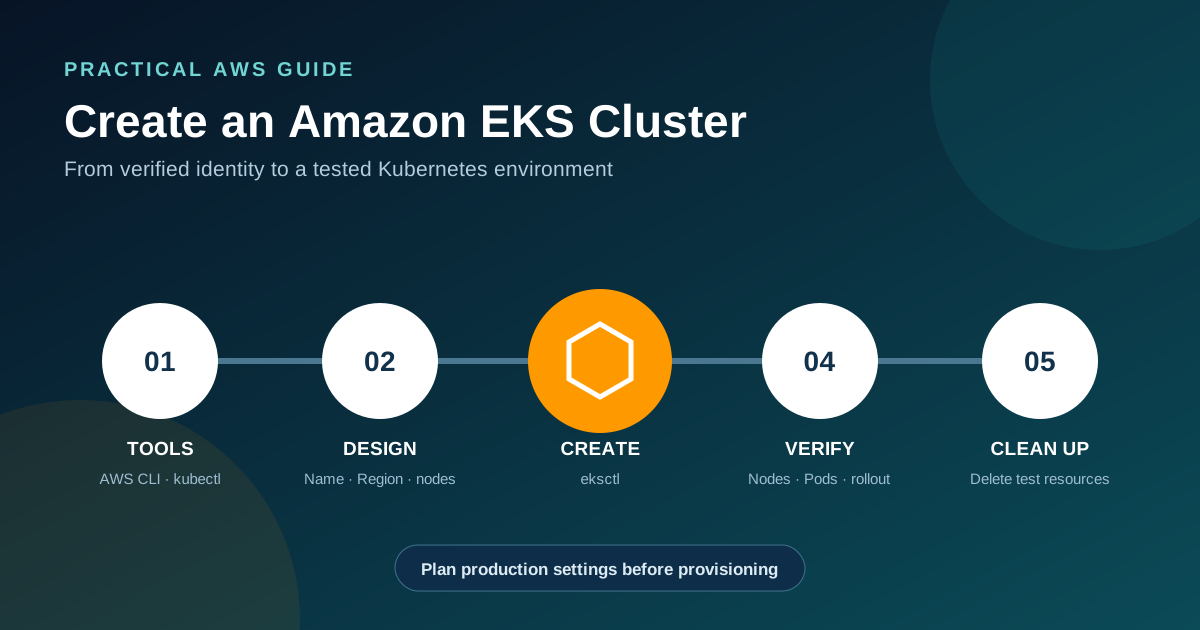
What you need to know
- The fastest AWS-documented path for a first standard EKS cluster is eksctl, with the AWS CLI and kubectl configured first.
- A quick-start command creates networking, an EKS control plane, and compute, but production clusters need explicit design decisions before creation.
- Verify AWS identity, cluster status, Kubernetes access, nodes, system Pods, and a small test workload before considering the cluster ready.
- Delete learning resources when finished to stop ongoing cluster and infrastructure charges.
Before you create an EKS cluster
This walkthrough uses eksctl to create a standard Amazon EKS cluster with a managed node group. AWS identifies eksctl as the fastest and simplest route for a first cluster. The command creates real billable AWS resources, so use an approved account, select the intended Region, and remove the cluster after a temporary test.
A learning cluster and a production cluster are different projects. AWS warns that default quick-start settings are intended to simplify getting started. Before production use, review network address space, private and public endpoint access, subnets, identity, logging, encryption, Kubernetes version support, compute type, capacity across Availability Zones, add-ons, backups, and upgrade ownership.
Standard EKS versus EKS Auto Mode
This procedure creates a standard cluster so the control plane and managed node group are visible as separate choices. EKS Auto Mode follows a different AWS procedure and manages more compute, networking, load balancing, and storage infrastructure. Choose the operating model before copying a command.
Continue reading: Read the concise EKS definition · Understand EKS architecture first · AWS: Get started with Amazon EKS ↗
Step 1: Install and configure the required tools
Install a current AWS CLI, kubectl, and eksctl version that meets the compatibility guidance in the Amazon EKS documentation. Configure AWS credentials for an IAM principal allowed to create the cluster, IAM roles, networking resources, CloudFormation stacks, and node capacity required by the chosen configuration.
Confirm the active AWS identity before provisioning. This prevents a common and expensive mistake: creating the cluster in the wrong account or under an unintended role.
aws --version
kubectl version --client
eksctl versionaws sts get-caller-identityContinue reading: AWS: Set up kubectl and eksctl ↗ · AWS: Set up to use Amazon EKS ↗
Step 2: Choose a name, Region, and compute model
Choose a short cluster name and an AWS Region that supports EKS and is appropriate for users, data residency, connected services, and operational coverage. The name must be unique within the selected account and Region. The examples below use demo-eks and us-east-1; replace both values deliberately.
This guide uses a managed node group because it demonstrates a conventional cluster with EC2 worker nodes. If the goal is a more AWS-managed Kubernetes infrastructure model, follow the separate EKS Auto Mode creation procedure. If the workload should run on Fargate, use the Fargate quick-start option and confirm its workload constraints first.
export EKS_CLUSTER_NAME=demo-eks
export AWS_REGION=us-east-1
Continue reading: How Auto Mode changes the operating model · AWS: EKS service endpoints and quotas ↗
Step 3: Create the cluster with eksctl
Run the command below from a trusted workstation or AWS CloudShell. eksctl uses CloudFormation to create the required resources and normally updates the local kubeconfig when creation succeeds. Provisioning can take several minutes.
The explicit managed flag makes the compute choice clear. For a durable environment, prefer a reviewed eksctl configuration file kept in version control so networking, access, node groups, tags, logging, and other settings are repeatable and reviewable.
eksctl create cluster \
  --name "$EKS_CLUSTER_NAME" \
  --region "$AWS_REGION" \
  --managed
Continue reading: AWS: Get started with EKS using eksctl ↗
Step 4: Verify cluster access and health
Do not stop at a successful create message. Check the EKS control-plane status through AWS, refresh kubeconfig explicitly, and confirm that kubectl can reach the intended cluster. Then inspect nodes and system Pods. Nodes should become Ready, and the required system workloads should settle into a healthy running state.
If kubectl is unauthorized, verify the active IAM principal and the cluster access configuration rather than repeatedly recreating kubeconfig. Cluster access should be granted through a reviewed identity model, not broad permanent administrator credentials.
aws eks describe-cluster \
  --name "$EKS_CLUSTER_NAME" \
  --region "$AWS_REGION" \
  --query 'cluster.status'

aws eks update-kubeconfig \
  --name "$EKS_CLUSTER_NAME" \
  --region "$AWS_REGION"

kubectl config current-contextkubectl get nodes -o wide
kubectl get pods -A -o wideStep 5: Deploy and remove a test workload
Create a small internal test Deployment to verify scheduling, image retrieval, and rollout behavior. This example does not expose the application to the internet. Review the image and your organization's software supply-chain rules before using any sample image in a controlled environment.
After the rollout succeeds, inspect the Deployment and Pods, then remove the test workload. A successful sample is only a basic connectivity check; production readiness also requires tests for identity, secrets, storage, network paths, load balancing, observability, scaling, disruption, backup, and recovery.
kubectl create deployment web-demo \
  --image=public.ecr.aws/nginx/nginx:stable

kubectl rollout status deployment/web-demo
kubectl get deployment,pods -o widekubectl delete deployment web-demoProduction decisions to make before launch
A production EKS cluster should be created from a reviewed, repeatable definition rather than an undocumented terminal command. Some settings are difficult or disruptive to change later. Treat the first production build as infrastructure design, not merely cluster provisioning.
- Network design: VPC CIDR capacity, private subnets, endpoints, egress, security groups, and Pod IP growth.
- Access: EKS access entries, least privilege, break-glass administration, workload identity, and audit logging.
- Reliability: multiple Availability Zones, replicas, topology rules, disruption budgets, health checks, and tested recovery.
- Compute: Auto Mode, Fargate, managed node groups, Spot strategy, instance families, scaling, and workload isolation.
- Operations: supported Kubernetes versions, add-on ownership, observability, cost allocation, backups, and upgrade rehearsals.
- Delivery: version-controlled infrastructure, policy checks, image controls, deployment rollback, and environment promotion.
Continue reading: AWS: Amazon EKS Best Practices Guide ↗ · AWS: EKS reliability best practices ↗
Step 6: Delete a learning cluster safely
Delete temporary Kubernetes Services of type LoadBalancer, persistent volumes, and other externally provisioned resources before deleting a learning cluster. Then ask eksctl to remove the cluster and its managed resources. Confirm the result in the EKS and CloudFormation consoles and check for intentionally retained resources.
The delete command is destructive. Run it only after checking the active account, Region, cluster name, and kubectl context. Never reuse a copied production cluster name in a cleanup command.
aws sts get-caller-identity
kubectl config current-context

eksctl delete cluster \
  --name "$EKS_CLUSTER_NAME" \
--region "$AWS_REGION"Frequently asked questions
What is the easiest way to create an EKS cluster?
AWS identifies the eksctl getting-started path as the fastest and simplest method for a first standard EKS cluster. Production environments should use a reviewed configuration or infrastructure-as-code workflow.
What tools do I need before creating an EKS cluster?
For this workflow, install and configure the AWS CLI, kubectl, and eksctl, then confirm that the active IAM principal has the required permissions.
Does eksctl create worker nodes?
Yes, the standard quick-start command can create the EKS control plane and a managed node group. eksctl can also create Fargate-based or more customized configurations.
How long does EKS cluster creation take?
AWS says cluster creation takes several minutes. Actual time varies with Region, configuration, networking, capacity, service quotas, and CloudFormation progress.
How do I avoid charges after the tutorial?
Remove temporary externally provisioned resources, delete the cluster with the correct name and Region, confirm CloudFormation cleanup, and review the account for retained resources.